
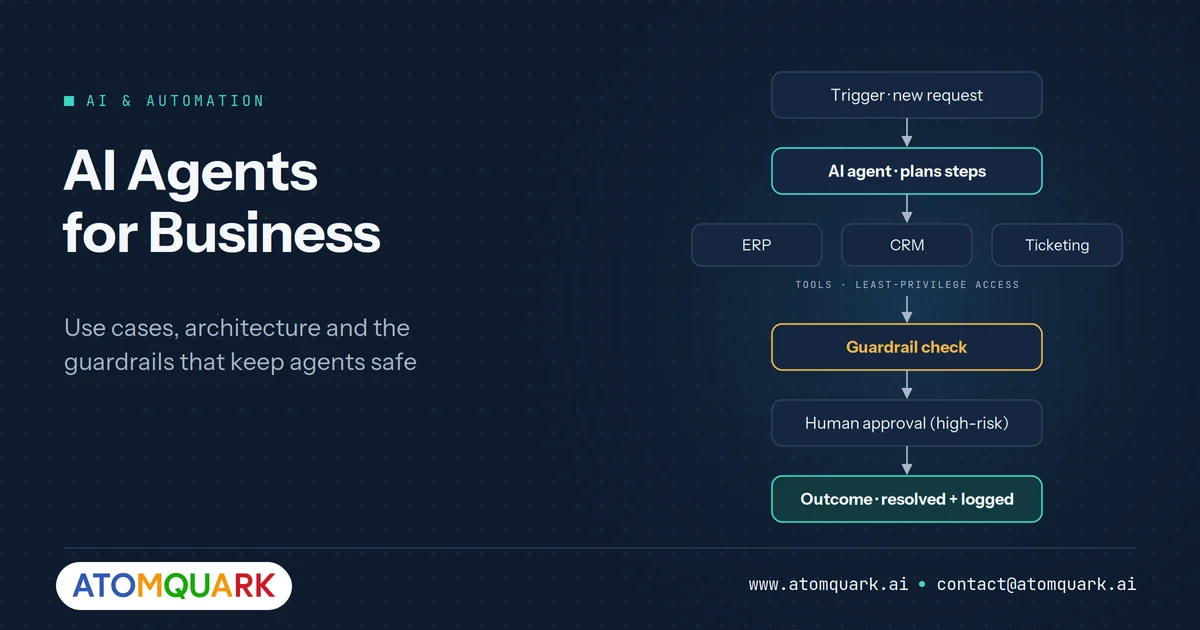
Most companies have tried a chatbot. Fewer have tried software that reads a request, decides what needs doing, uses three different systems to do it, and only pulls in a human when something looks off. That second category is what people mean by AI agents for business, and it is where a lot of 2026 automation budgets are heading.
The appeal is obvious. The risk is too. An agent that can act inside your ERP can also make mistakes inside your ERP. This guide covers where agents earn their keep, how they are built, and the guardrails that separate a useful agent from an expensive incident.
What is an AI agent (and how is it different from a chatbot)?
An AI agent is a system that uses a language model to plan and carry out multi-step tasks by calling tools, such as APIs, databases and business applications, rather than only generating text. A chatbot answers. An agent acts.
A practical way to tell them apart:
- Chatbot: "Your order shipped on Tuesday." It retrieves and replies.
- Workflow automation (RPA): follows a fixed script. If the screen changes, it breaks.
- AI agent: reads the customer's complaint, checks the order in the ERP, sees the courier scan is missing, opens a claim with the carrier, drafts a reply, and asks a human to approve the refund if it exceeds a threshold.
Agents sit between rigid automation and fully human work. They handle variation well, but they need boundaries.
Where AI agents for business actually pay off
The best early use cases share three traits: high volume, a clear definition of "done", and access to systems the agent can safely read and write. Here are the areas where we see the strongest fit.
IT and employee support
Password resets, access requests and software provisioning follow predictable patterns but arrive in messy language. An agent can classify the request, check entitlement rules, trigger the provisioning API and close the ticket. This is the logic behind AI helpdesks such as Atomquark SupportDesk, which Atomquark reports auto-resolves around 60% of routine tickets.
After-sales and warranty operations
Warranty work involves documents, eligibility rules and finance postings. An agent can extract data from a claim, check coverage against master data, flag anomalies and prepare a credit note for review. Our article on automating warranty claim adjudication walks through the rules layer that makes this safe.
Finance and procurement back office
Invoice matching, vendor queries and expense policy checks are document-heavy and rule-bound. Agents do well here when every financial action passes through an approval step.
Sales and customer operations
Agents can enrich leads, summarise account history before a call, and update CRM records after it. The value is less about replacing reps and more about removing the admin they hate.
How enterprise AI agents are built
You do not need to understand every framework, but you should know the five building blocks, because each one is a decision with cost and risk attached.
1. The model
Large models handle open-ended reasoning. Smaller models are cheaper, faster and can run privately. Many production systems route simple steps to a small model and hard steps to a large one. We compare the trade-offs in small language models vs LLMs.
2. Tools
Tools are the functions an agent may call: "look up order", "create ticket", "post journal entry". Keep the list short and the permissions narrow. An agent with fifty tools is harder to test than one with six.
3. Knowledge grounding
Agents need your policies, product data and process documents, usually supplied through retrieval-augmented generation (RAG), so they act on facts rather than guesses.
4. Memory and state
Multi-step tasks need a record of what has been done. Store this state outside the model so you can audit and resume it.
5. Orchestration and guardrails
This is the control layer: which steps need approval, what the agent may never do, and when it must hand over to a person.
Guardrails: the part most pilots skip
Most failed agent projects do not fail because the model is weak. They fail because nobody defined what the agent was allowed to do. Before any agent touches production, put these controls in place.
- Least-privilege access. Give the agent its own service identity with only the permissions its tools need. Never reuse an admin account.
- Action thresholds. Let the agent act alone below a value or risk limit (a refund under a set amount, for example) and require human approval above it.
- Read before write. Start agents in "suggest" mode, where they draft actions for humans to approve. Move to autonomous action one task type at a time.
- Full audit trail. Log every prompt, tool call, input and output. If you cannot reconstruct why an agent did something, you cannot defend it to an auditor.
- Prompt-injection defences. Treat content the agent reads (emails, web pages, uploaded files) as data, not instructions.
- Kill switch. Someone must be able to pause the agent instantly.
If your organisation handles regulated or sensitive data, consider where the model runs. Private and on-premise AI keeps prompts and documents inside your own boundary.
A 90-day path from idea to production
Days 1–30: pick one workflow and measure it
Choose a single process with clear volume and a baseline you can measure, such as average handling time or cost per ticket. Map every system it touches. Our enterprise AI adoption roadmap explains how to rank candidate use cases.
Days 31–60: build in suggest mode
Connect read-only tools first. Let the agent draft actions and have staff approve or correct them. Every correction is test data.
Days 61–90: graduate low-risk actions
Once the agent's drafts are consistently approved without edits, allow it to execute that specific action autonomously. Keep higher-risk actions in approval mode.
How to tell whether an agent is working
An agent that runs without errors is not necessarily an agent that helps. Track a small set of measures from the first day of the pilot, and compare them with the baseline you recorded before the agent existed.
- Task completion rate: the share of tasks the agent finishes without a human taking over.
- Human override rate: how often reviewers change or reject the agent's proposed action. This is the single best early signal of readiness for autonomy.
- Time per task: end-to-end time, including any wait for human approval.
- Cost per task: model usage, infrastructure and the reviewer time still required.
- Error and incident rate: actions that had to be reversed, and their business impact.
- User satisfaction: for customer- or employee-facing agents, ask the people on the other end.
Common failure modes to watch for
- Looping: the agent repeats the same tool call because it cannot interpret the result. Cap the number of steps per task.
- Confident wrong actions: the agent acts on incomplete data. Require it to check key facts before writing to any system.
- Scope creep: the agent attempts tasks it was never designed for. Reject out-of-scope requests explicitly and route them to a person.
- Silent drift: performance degrades as policies, systems or data change. Re-run your test set every time something upstream changes.
Build in-house or use AI as a Service?
Building agents in-house needs ML engineers, platform engineers, security review and ongoing model operations. That is realistic for large technology teams and a stretch for most others.
Atomquark's AI as a Service offers a middle path: Atomquark designs, hosts and manages the models and integrations, including small language models on private infrastructure, while your team owns the process decisions. For organisations still shaping their strategy, technology and AI advisory consulting can help define the use-case shortlist first.
Frequently Asked Questions
What is the difference between AI agents and RPA?
RPA follows fixed, pre-recorded steps and breaks when inputs or screens change. AI agents use a language model to interpret varied inputs and decide which steps to take, which makes them better suited to unstructured requests.
Are AI agents safe to use with business systems?
They can be, provided they run with least-privilege permissions, approval thresholds for high-impact actions, full audit logging and defences against prompt injection. Start in suggest mode before allowing autonomous actions.
What is a good first use case for AI agents in business?
High-volume, rule-bound work with a clear definition of done, such as IT access requests, password resets, invoice matching or warranty claim pre-checks.
Do AI agents need a large language model?
Not always. Many enterprise agents route routine steps to smaller, cheaper models and reserve large models for complex reasoning.
How long does it take to deploy an AI agent?
A focused single-workflow agent can typically reach a supervised production pilot within about three months, depending on system access and data readiness.
Ready to put an agent to work?
Start with one workflow, measurable goals and proper guardrails. Talk to Atomquark.ai about an AI agent readiness assessment and find out which of your processes is ready first.