
Attendance sounds like the simplest HR process there is. Then you add three office locations, a hybrid policy, field staff, shift workers and payroll deadlines, and it becomes the process everyone complains about.
A good employee attendance management system removes that friction: accurate records, fewer disputes, and payroll inputs nobody has to re-key. This guide compares capture methods, lists the features worth paying for, and lays out a rollout plan that avoids the usual backlash.
What is an employee attendance management system?
It is software that records when and where employees work, applies attendance and leave policies, routes approvals, and produces data for payroll and compliance. Modern systems go beyond clocking in and out to include leave balances, shifts, work-from-home rules and analytics.
Attendance capture methods compared
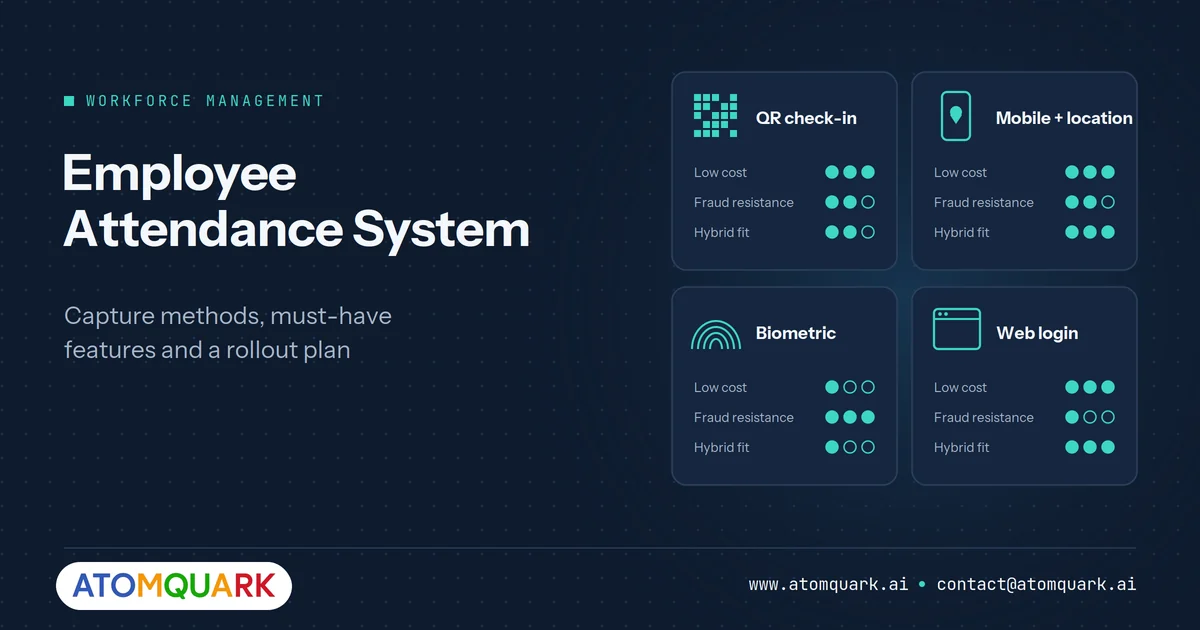
There is no single best method. The right one depends on where your people work and how much you worry about buddy-punching.
QR code check-in
Employees scan a QR code displayed at the office entrance using their phone. Rotating or one-time codes, paired with an OTP or app login, make sharing a screenshot useless.
Best for: offices and branches. Low cost, no hardware beyond a screen or printed code with rotation.
Mobile app with location
Staff check in from a mobile app that records location, or only allows check-in within a defined zone.
Best for: field sales, service technicians and site staff. Be transparent about what location data is collected and when.
Biometric devices
Fingerprint or face readers at entry points.
Best for: factories and high-security sites. Higher hardware cost, and biometric data carries extra privacy obligations under data protection laws such as India's Digital Personal Data Protection Act.
Web or desktop login
Attendance marked when employees log into a portal or start their working session.
Best for: fully remote or desk-based teams. Easiest to deploy, weakest proof of presence.
Most organisations end up mixing methods: QR at offices, mobile for the field, web for remote days. Your system should support that mix without separate tools.
Must-have features
Policy-driven attendance rules
Shifts, grace periods, half-days, overtime and weekly offs should be configured once and applied automatically, with different rules per location or team.
Integrated leave management
Leave requests, balances, holidays and approvals belong in the same system as attendance. Otherwise HR spends every month reconciling two sources.
Hybrid and multi-location support
Employees should be able to mark office, work-from-home or branch days, with each location's time zone and calendar respected.
Approval workflows
Regularisation requests (forgotten check-ins, on-duty travel) need a clear approval path with an audit trail.
Anomaly detection
Patterns such as habitual late arrivals, impossible check-in locations or sudden absence spikes should be flagged automatically instead of discovered at month-end.
Reports and payroll export
Monthly attendance summaries, overtime and loss-of-pay data should export cleanly to payroll in PDF or Excel formats.
Security and access control
Attendance data is personal data. Look for role-based access, single sign-on (SSO), multi-factor authentication (MFA) and encryption.
Common mistakes to avoid
- Buying for surveillance instead of fairness. Systems perceived as spying create resentment and workarounds. Position the tool as a way to make leave, overtime and payroll accurate.
- Ignoring exceptions. If regularisation is painful, employees stop trusting the data.
- Separate tools for attendance, leave and expenses. Every extra tool is another login and another reconciliation.
- No mobile option. If field staff cannot check in easily, they will not.
A 6-week rollout plan
- Week 1: document policies. Write down shift rules, grace periods, leave types and approval chains. Fix inconsistencies before configuring anything.
- Week 2: configure and import. Load employees, departments, locations and leave balances.
- Week 3: pilot. Run one team or branch in parallel with the old method and compare results.
- Week 4: fix and communicate. Adjust rules based on the pilot. Explain to all staff what is recorded, why and how to raise corrections.
- Weeks 5–6: go live and review. Switch over, then review the first payroll cycle closely before retiring the old process.
Attendance data and privacy
Attendance records are personal data, and location or biometric data is especially sensitive. In India, the Digital Personal Data Protection Act, 2023 and the DPDP Rules notified in November 2025 set obligations for organisations processing personal data, including giving notice of the purpose, collecting only what is needed and taking reasonable security safeguards. Similar principles apply under GDPR and other laws.
Practical steps:
- State the purpose of attendance data in your HR policy and in the employee notice.
- Collect the minimum. Record location at check-in only, not continuously, unless the role genuinely requires it.
- Restrict access so managers see their own teams and HR sees what it needs for payroll.
- Set retention periods and delete data that is no longer required.
- Secure the system with SSO, MFA, role-based access and encryption.
This is general guidance, not legal advice. Confirm your obligations with your legal or compliance team.
Measuring success after go-live
Review these measures after the first and third payroll cycles:
- Payroll corrections: how many attendance-related corrections were needed compared with before?
- Regularisation volume: a high rate of missed check-ins suggests the capture method is inconvenient for some teams.
- Approval turnaround: how long do leave and regularisation requests wait for managers?
- HR time spent: hours per month spent reconciling attendance and leave.
- Employee feedback: a short pulse survey on whether the system feels fair and easy to use.
If one team stands out, look at its working pattern before blaming the people. Field staff with poor mobile coverage, or shift workers whose rosters were configured incorrectly, often explain the outliers.
How TeamTrack handles attendance
TeamTrack by Atomquark is a cloud-native workforce management platform with six modules covering attendance, leave, expenses, planning, employee records and AI insights. Attendance supports OTP-based QR check-in with role-based access, a calendar view, pending approvals, attendance heatmaps and AI anomaly alerts. Work planning lets HR configure shifts, time zones and work locations (office, work from home or branch).
Its MyTime AI assistant lets employees ask about leave balances or attendance in plain language, and managers can build custom reports and export to PDF or Excel. SSO, MFA and end-to-end encryption are included. For the wider case for one platform, read our guide to smart workforce management. Expenses are covered in our expense management software guide.
Frequently Asked Questions
What is the best way to track employee attendance?
Use the method that fits each work setting: QR check-in for offices, mobile check-in for field staff and web login for remote days, all feeding one system with consistent policies.
Is QR code attendance secure?
It can be, if codes rotate or are single-use and check-in is tied to an authenticated app or OTP so screenshots cannot be shared.
Can attendance software handle hybrid work?
Yes. Look for systems that let employees mark office, work-from-home or branch days and apply location-specific rules and calendars.
Should attendance and leave be in the same system?
Yes. Keeping them together removes monthly reconciliation and gives payroll a single accurate source.
Is biometric attendance legal in India?
Biometric attendance is used widely, but biometric data is personal data. Organisations should collect it with a clear purpose and notice, secure it properly and follow applicable data protection law. Seek legal advice for your specific situation.
Make attendance the process nobody complains about
Fair, accurate and connected to leave and payroll. Request a TeamTrack demo and see attendance, leave and AI insights working together.