
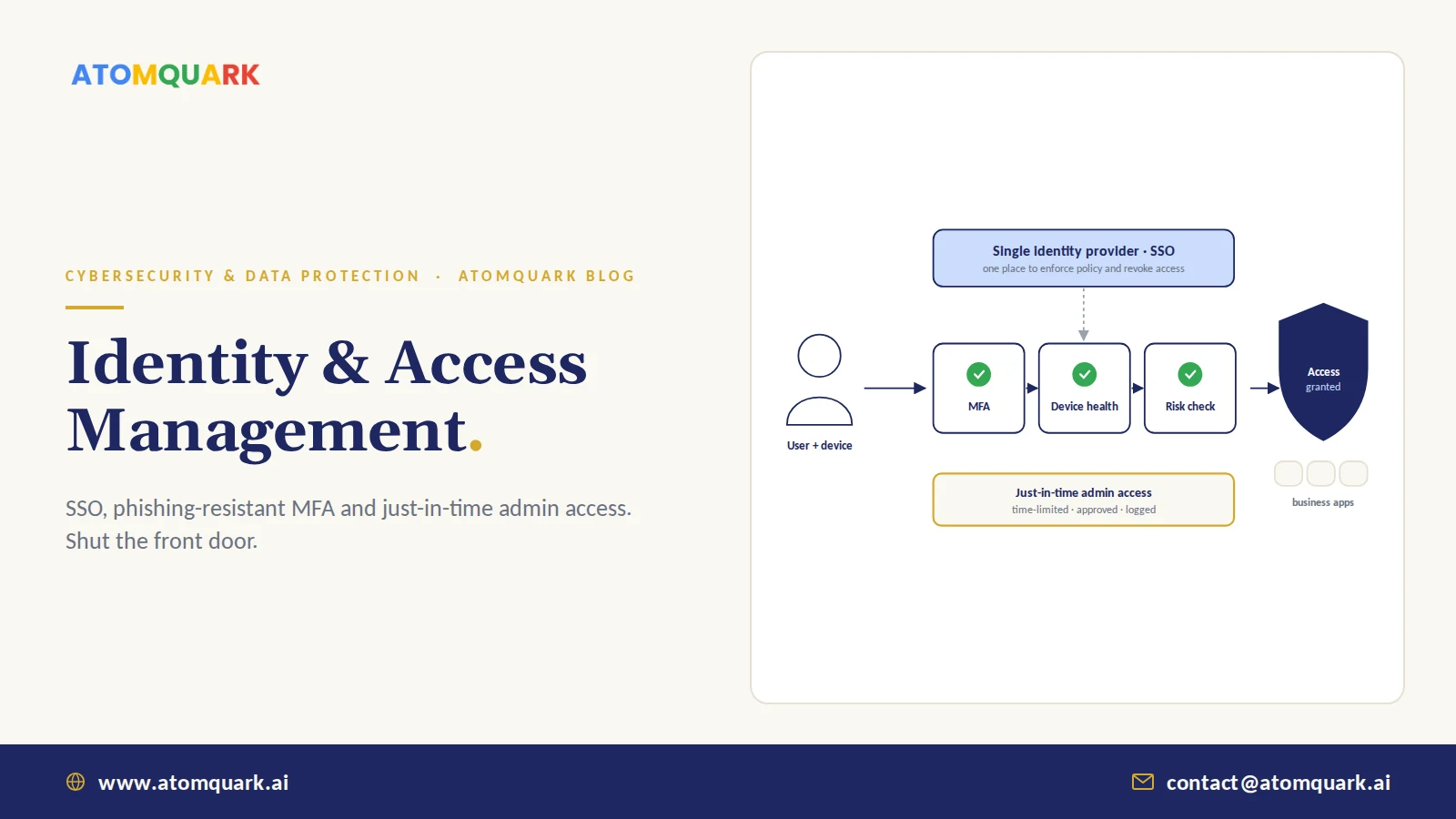
Identity and access management (IAM) is the set of policies and technologies that make sure the right people and systems get the right access to the right resources, at the right time, and nothing more. In practice it covers how users sign in (authentication), what they're allowed to do (authorisation), and how that access is granted, reviewed and removed over time. The identity and access management best practices below focus on the controls that stop most account-based attacks.
Firewalls used to be the front door. Now the front door is a login page. Employees work from home, apps live in the cloud, and attackers have learned it's easier to steal a password than to break through a network. Annual industry breach investigations have repeatedly found stolen or misused credentials among the most common ways attackers get in.
So identity is where security effort pays back fastest. These are the practices that matter most.
If you only do three things: centralise sign-in through one identity provider, require phishing-resistant MFA, and remove standing admin rights.
The Core Components of IAM
- Identity provider (IdP): the central directory and sign-in service, such as a cloud IdP.
- Single sign-on (SSO): one secure login for all business apps, federated through SAML or OpenID Connect.
- Multi-factor authentication (MFA): a second proof beyond a password.
- Authorisation and roles: what each identity may access, ideally assigned by role.
- Privileged access management: extra controls for admin accounts.
- Lifecycle management: joiner, mover and leaver processes.
- Monitoring and reviews: sign-in logs, risk detection and periodic access certification.
9 Identity and Access Management Best Practices
1. Centralise identity in one provider
Scattered local accounts across apps are impossible to secure or audit. Connect every app you can to a single IdP via SSO. Users get fewer passwords; IT gets one place to enforce policy and one switch to cut access.
2. Enforce MFA everywhere, starting with admins and email
MFA blocks the large majority of automated credential attacks. Roll it out to administrators first, then email and remote access, then everything else. CISA's MFA guidance is a clear, vendor-neutral reference.
3. Move to phishing-resistant MFA
Not all MFA is equal. SMS codes and push approvals can be phished or bypassed through "MFA fatigue" spamming. FIDO2 security keys and passkeys bind the login to the real website, so a fake page can't capture a usable credential. NIST SP 800-63B sets out authenticator assurance levels if you need a formal basis.
4. Eliminate standing admin rights
Permanent admin accounts are the most valuable target in any company. Privileged Identity Management (PIM) gives admins just-in-time elevation: they request admin rights for a task, with approval and a time limit, and the rights expire automatically.
5. Apply least privilege by role
Grant access by role, not by copying a colleague's permissions. Start narrow and add as needed. Role-based access also makes audits and leaver processing faster.
6. Use conditional access
Make access decisions on context: is the device managed and compliant, is the location expected, is the sign-in risky? Block or step up authentication when signals look wrong. Device signals come from endpoint MDM, which is why identity and endpoint security work best together.
7. Automate joiners, movers and leavers
Connect HR systems to the IdP so accounts are created on day one, adjusted on role change and disabled the moment someone leaves. Orphaned accounts of former staff and contractors are a common, avoidable risk.
8. Review access regularly
Quarterly reviews for privileged and sensitive access, at least annually for everything else. Managers confirm or remove each permission. It's tedious; automate the reminders and evidence collection.
9. Govern non-human identities too
Service accounts, API keys and now AI agents all hold access. Give each a named owner, least privilege, secrets stored in a vault and regular rotation.
IAM and Zero Trust
Identity is the first pillar of Zero Trust, which assumes no user or device is trusted by default. NIST SP 800-207 describes the architecture. Our Zero Trust implementation roadmap shows how identity controls lead into device, data and network phases, and sign-in logs should feed your SIEM for detection.
A Phased IAM Rollout Plan
- 1. Foundation — Focus: single IdP, SSO for top apps, MFA for admins and email. Typical duration: 4 to 8 weeks.
- 2. Hardening — Focus: MFA for all users, conditional access, legacy authentication blocked. Typical duration: 1 to 2 months.
- 3. Privilege — Focus: PIM and just-in-time admin, admin account clean-up. Typical duration: 1 to 2 months.
- 4. Governance — Focus: automated lifecycle, access reviews, non-human identity controls. Typical duration: ongoing.
Durations vary with company size and the number of legacy apps. The biggest delays usually come from old systems that don't support modern sign-in protocols, so inventory those early.
Atomquark's SecureShield delivers this as a managed service: cloud IdP, SSO federation, MFA, PIM with just-in-time admin access and conditional access, as part of a phased Zero Trust programme aligned with NIST and CISA guidance.
Practical Example: An IAM Rollout for a 250-Person Company
An illustrative rollout for a mid-size company with a cloud productivity suite, a CRM, an HR system, AWS and a handful of legacy tools:
- Weeks 1 to 4: Foundation. Make the cloud identity provider the single source of truth. Connect the CRM, HR system and AWS console through SSO. Turn on MFA for the 12 admin accounts and for email. Inventory every app that still uses its own passwords.
- Weeks 5 to 10: Hardening. Extend MFA to all users using an authenticator app, with FIDO2 keys for admins and finance. Block legacy authentication protocols. Add conditional access: company data only from compliant devices, and step-up authentication for sign-ins from new countries.
- Weeks 11 to 16: Privilege. Remove permanent global admin rights. Admins request just-in-time elevation with approval and a four-hour limit. Separate admin accounts from daily accounts.
- Ongoing: Governance. HR-driven provisioning, so leavers lose access the same day. Quarterly reviews for admin and finance access. A register of service accounts and API keys with owners.
The typical friction point isn't technology. It's the legacy app that can't do SSO. Decide early whether to replace it, wrap it behind a secure gateway, or accept and monitor the risk.
Conclusion
Most attacks now start with identity, so most defence should too. Centralise sign-in, require phishing-resistant MFA, remove standing admin rights, use device and risk signals, and keep access tidy as people join, move and leave. None of this is exotic. It just needs to be done consistently.
Schedule a SecureShield identity security assessment to see where your gaps are, explore Atomquark's broader IT consulting and cyber security services, or contact the team directly.
Frequently Asked Questions
What is identity and access management?
Identity and access management is the framework of policies and tools that controls who can sign in to which systems and what they can do there, covering authentication, authorisation, provisioning, privileged access and access reviews.
What is the difference between SSO and MFA?
Single sign-on lets users access many applications with one login. Multi-factor authentication requires an additional proof of identity, such as a security key or app approval, at sign-in. They work best together.
What is phishing-resistant MFA?
Phishing-resistant MFA uses methods such as FIDO2 security keys or passkeys that are cryptographically tied to the genuine website, so credentials cannot be captured and reused through a fake login page.
What is just-in-time admin access?
Just-in-time access grants administrative rights only when needed for a specific task, usually with approval and an automatic expiry, instead of leaving permanent admin rights on accounts.
How often should access reviews be done?
Privileged and sensitive access should be reviewed at least quarterly, and general access at least annually, or whenever compliance frameworks such as SOC 2 or ISO 27001 require.
Is IAM only for large enterprises?
No. Small and mid-size businesses are frequent targets because their controls are weaker. Cloud identity providers make SSO, MFA and conditional access affordable for organisations of any size.