
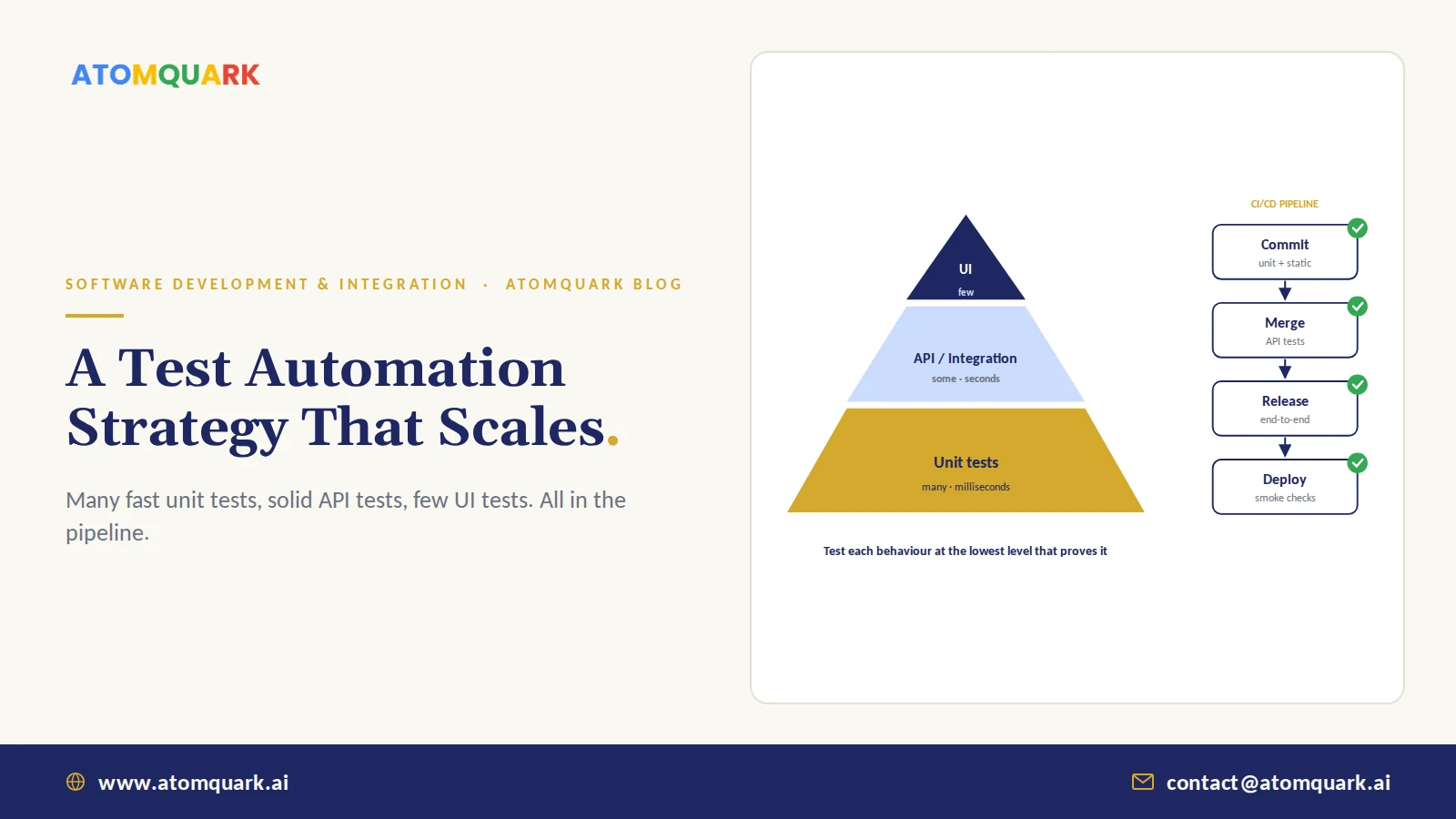
A test automation strategy is a plan for which software tests you automate, at what level, with which tools, and how they run in your delivery pipeline, so every change is checked quickly and reliably before it reaches users. It balances fast, cheap unit tests with fewer, slower end-to-end tests, and keeps human testers for exploration and judgment.
Here's a pattern many teams know too well. Someone records 400 UI tests in a burst of enthusiasm. Six months later, the suite takes three hours, fails randomly, and everyone has learned to click "re-run" until it goes green. Automation has become noise.
The fix isn't more tests. It's the right tests at the right level.
Core principle: Test each behaviour at the lowest level that can prove it. Push checks down the pyramid wherever possible.
Why Test Automation Matters for Delivery Speed
Teams that release often depend on fast, trustworthy feedback. Long-running industry research on software delivery performance (the source of the DORA metrics) has linked continuous testing with better software delivery performance. Manual regression testing simply can't keep pace with weekly or daily releases, and it's where defects slip through when deadlines tighten.
The Test Pyramid: Your Starting Model
The test pyramid, popularised by Mike Cohn, still holds up:
- Unit tests — What it tests: individual functions and classes. Speed: milliseconds. How many: many (thousands).
- API / integration tests — What it tests: services, databases and integrations working together. Speed: seconds. How many: moderate (hundreds).
- UI / end-to-end tests — What it tests: critical user journeys through the real interface. Speed: minutes. How many: few (dozens).
- Manual exploratory testing — What it tests: usability, edge cases, "does this feel right?" Speed: human time. How many: targeted sessions.
The common anti-pattern is the "ice cream cone": almost everything tested through the UI. It's slow, brittle and expensive to maintain.
What to Automate First
Prioritise by risk and repetition:
- Critical business flows: login, checkout, payments, order creation, claim submission.
- Areas that break often: check your defect history.
- Regression-heavy features: anything touched in most releases.
- API contracts between services: especially where other teams or partners depend on them; see our guide to enterprise API integration.
- Data-heavy rules: pricing, tax and eligibility logic with many combinations.
What not to automate: one-off checks, features about to be redesigned, and usability judgments.
Choosing Test Automation Tools
Pick open, well-supported tools that fit your stack and team skills rather than chasing the newest name:
- Unit: the native framework for your language (JUnit, NUnit or xUnit, pytest, Jest).
- API: code-based API tests in your main language, plus consumer-driven contract tests between services.
- Web UI: open-source browser automation frameworks such as Playwright or Selenium.
- Mobile: Appium, or Espresso and XCUITest for native apps.
- Code quality and security: static code analysis and dependency scanning in the pipeline.
- Visual regression: screenshot comparison to catch unintended layout changes.
Run Tests in Your CI/CD Pipeline
Automation only pays off when it runs on every change:
- On every commit: unit tests and static analysis, finishing in minutes.
- On every merge: API and integration tests.
- Before release: the end-to-end suite on a production-like environment.
- After deploy: smoke tests and monitoring to catch what slipped through.
Fail the build on test failure. A pipeline that's allowed to stay red teaches everyone to ignore it.
How to Fix Flaky Tests
Flaky tests, which pass and fail without code changes, destroy trust faster than anything else. Typical causes and fixes:
- Timing issues: replace fixed sleeps with explicit waits for conditions.
- Shared test data: give each test its own data, created and cleaned up automatically.
- Order dependence: make every test runnable alone and in any order.
- External dependencies: stub third-party services at lower test levels.
Quarantine flaky tests immediately, track them, and fix or delete them within a set time.
Where AI Is Changing Software Testing
AI is genuinely useful in QA, within limits. Practical uses today include generating unit test drafts from code, suggesting test cases from requirements, self-healing UI locators when elements change, spotting visual regressions and identifying flaky tests from run history. These are part of the AI-driven SDLC approach Atomquark applies across delivery.
The limit: AI-generated tests check what the code does, not necessarily what it should do. Engineers still own test intent and review generated tests like any other code.
Measuring Your Test Automation Strategy
Track a handful of metrics:
- Pipeline duration from commit to feedback.
- Flaky test rate.
- Defects escaping to production, and at which level they should have been caught.
- Coverage of critical user journeys (more useful than raw line coverage alone).
- Change failure rate, a DORA metric.
Practical Example: Rescuing a Slow, Flaky Test Suite
An illustrative team has 600 UI tests that take 2.5 hours, fail randomly about one run in four, and get re-run until they pass. Releases happen fortnightly because nobody trusts the suite.
A practical rescue plan over two to three months:
- Quarantine every test that failed without a code change in the last 30 runs. The main suite becomes trustworthy overnight, if smaller.
- Map the remaining UI tests to business journeys. Many check the same thing through different screens; keep one per journey.
- Push down: validation rules, calculations and permissions move to unit and API tests, which run in seconds.
- Fix the causes of flakiness in quarantined tests: replace sleeps with waits, isolate test data, stub third-party services.
- Restructure the pipeline: unit tests and static analysis on every commit, API tests on merge, a lean set of around 60 end-to-end journeys before release.
- Track pipeline time, flaky rate and escaped defects weekly.
The usual result: feedback in minutes rather than hours, a suite people believe, and the confidence to release more often. The total number of tests often goes up, while the number of slow ones goes down.
Conclusion
A scalable test automation strategy is mostly about discipline: many fast unit tests, a solid layer of API tests, a small set of critical end-to-end journeys, all running on every change, with flaky tests treated as bugs. Add AI where it saves effort, and keep humans exploring what scripts can't.
Atomquark's custom software development team provides manual and automated testing across functional, regression, performance, security and UAT, and our technical due diligence and product audits often start with test health. Get a QA and test automation review.
Frequently Asked Questions
What is a test automation strategy?
A test automation strategy is a plan defining which tests to automate, at which levels, using which tools, and how they run within the CI/CD pipeline, so software changes are validated quickly and reliably.
What is the test pyramid?
The test pyramid is a model recommending many fast unit tests at the base, fewer integration or API tests in the middle and a small number of slow end-to-end UI tests at the top.
What tests should be automated first?
Start with critical business flows, frequently broken areas, regression-heavy features, API contracts and complex business rules. Avoid automating one-off checks or features about to change.
Is manual testing still needed?
Yes. Manual exploratory testing remains valuable for usability, unexpected edge cases and new features, while automation handles repetitive regression checks.
How do you reduce flaky tests?
Replace fixed waits with condition-based waits, isolate test data, remove dependencies between tests, stub unstable external services and quarantine flaky tests until they are fixed.
Can AI write automated tests?
AI tools can generate draft unit tests, propose test cases and maintain UI locators. Engineers should still review generated tests to make sure they check intended behaviour rather than simply mirroring existing code.