
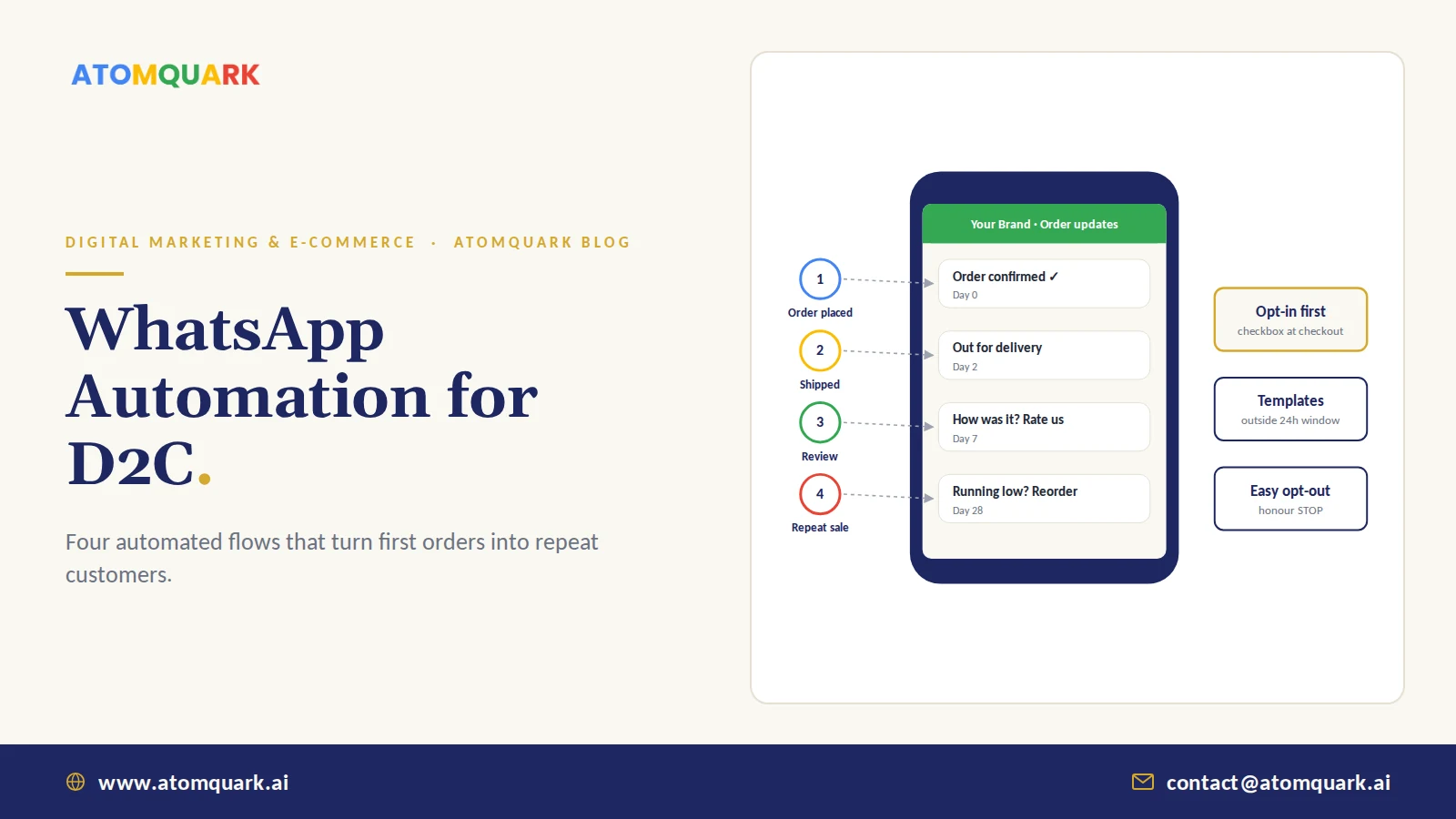
WhatsApp automation for e-commerce means using the WhatsApp Business Platform, connected to your online store, to send customers automatic, personalised messages at key moments: order confirmation, shipping updates, delivery, review requests and reorder reminders. It also lets you answer common questions with bots and hand over to a human when needed.
For D2C brands, the first sale is the expensive one. Ads, influencers and discounts all go into winning it. Profit usually lives in the second and third orders, and that's where WhatsApp earns its place, especially in markets like India where customers already live in the app.
Below are the flows we set up for D2C storefronts, and the rules that keep them working.
Start here: Automate the order lifecycle first (confirmation, shipping, delivery). Then add review requests and replenishment nudges. Broadcast offers come last.
WhatsApp Business App vs WhatsApp Business Platform (API)
- Best for — Business app: very small sellers, manual chats. Business Platform (API): growing brands needing automation.
- Automation — Business app: basic quick replies and greetings. Business Platform: full automation via your store, CRM and workflows.
- Users — Business app: a few devices. Business Platform: many agents, shared inbox via providers.
- Integrations — Business app: minimal. Business Platform: store, CRM, helpdesk, workflow tools.
- Messaging outside 24h window — Business app: not structured. Business Platform: approved template messages.
Most brands access the WhatsApp Business Platform through an approved WhatsApp Business Solution Provider, or connect directly through Meta.
The Two Rules That Shape Every Flow
- Opt-in is mandatory. Customers must agree to receive WhatsApp messages from you, typically via a checkbox at checkout or a click-to-chat action. Meta's WhatsApp Business Messaging Policy sets the rules. Messaging people who didn't opt in leads to blocks, low quality ratings and messaging limits.
- Templates outside the 24-hour window. When a customer messages you, you can reply freely for 24 hours. Business-initiated messages outside that window must use pre-approved templates. Meta charges for template messages by category (marketing, utility, authentication), so check current rates for your markets.
WhatsApp Automation for E-Commerce: Four Flows That Pay Back
1. Order confirmation (immediately after purchase)
Order number, items, amount and expected delivery. It reassures the customer, reduces "where is my order?" contacts, and for cash-on-delivery orders it's the moment to confirm intent, which can reduce failed deliveries.
2. Shipping and delivery updates
Dispatched, out for delivery, delivered, each with a tracking link. Fewer support tickets, fewer anxious emails.
3. Review request (about 7 days after delivery)
Late enough for the customer to have tried the product, early enough that they still remember buying it. Link straight to the review page. Reviews feed both marketplace rankings and on-site conversion.
4. Replenishment nudge (timed to product use)
For consumables such as supplements, skincare, food and household goods, remind customers when they're likely to run low. Atomquark's digital marketing and e-commerce team uses a 28-day reorder nudge for monthly-supply products; set your timing from the actual pack size and usage.
Additional Flows Worth Adding
- Abandoned cart recovery: a reminder with the cart link, only for customers who opted in.
- Back-in-stock alerts: for customers who asked to be notified.
- Festival and launch broadcasts: segmented offers for Diwali, Black Friday or a new product, sent sparingly.
- Support bot with human handover: order status lookups and FAQs automated, complaints routed to a person.
How the Automation Works Behind the Scenes
A typical setup connects four pieces:
- Store: Shopify, nopCommerce or a custom platform emits order events.
- Workflow engine: a tool such as n8n listens for events, applies timing and logic, and calls the messaging provider.
- WhatsApp provider: sends approved templates and manages the shared inbox.
- CRM and analytics: records each message and tracks conversions in GA4.
Choosing between storefront platforms? Our nopCommerce vs Shopify comparison covers how each handles integrations like this.
Best Practices That Protect Your Number
- Keep utility messages useful. Order and delivery updates should never carry hard-sell content.
- Cap marketing frequency. A couple of promotional messages a month is plenty for most audiences.
- Personalise. Name, product and timing tailored to the order.
- Make opting out easy. Honour "STOP" immediately.
- Watch your quality rating in WhatsApp Manager and pull back if it drops.
- Protect customer data. Phone numbers and order details are personal data under laws such as India's DPDP Act and the GDPR.
Measuring Results
Track delivery and read rates per template, click-through on review and reorder links, repeat purchase rate for customers in WhatsApp flows versus those who aren't, reduction in "where is my order?" tickets, and opt-out rate.
Practical Example: Setting Up Flows for a Supplement Brand
An illustrative D2C supplement brand sells 30-day packs on its own site, Amazon and Flipkart, with most own-site customers in India and a growing share in the UK.
The WhatsApp setup:
- Opt-in: a pre-ticked box is not allowed, so checkout shows an unticked "Get order updates on WhatsApp" box, plus a click-to-chat button on product pages.
- Order confirmation (utility template): name, order number, items and delivery estimate. For cash-on-delivery orders, a "Confirm order" quick-reply button.
- Shipping and delivery (utility): dispatch with tracking link, then "delivered" with a how-to-use tip for first-time buyers.
- Review request (day 7, marketing or utility depending on wording): a one-tap link to the review page.
- Reorder nudge (around day 25 to 28, marketing): "Running low?" with a one-click reorder link and the customer's last product pre-filled.
- Support bot: answers order status from the store API and hands complaints to a human agent in the shared inbox.
Flows run through a workflow engine listening to store events, so timing adapts to the actual delivery date rather than the order date. The team reviews read rates, reorder clicks and opt-outs monthly and adjusts timing per product.
WhatsApp works for D2C because it reaches customers where they already are, at moments they actually care about. Start with order lifecycle messages, add review requests and timed reorder nudges, keep promotions rare and relevant, and respect opt-in and template rules.
Atomquark's digital marketing and e-commerce team builds N8N-powered WhatsApp order workflows alongside storefronts, SEO and paid ads, as in our work with Fitam Ventures across the USA, India and UK. Set up WhatsApp order automation for your store.
Frequently Asked Questions
Can I automate WhatsApp messages for my online store?
Yes. By connecting your store to the WhatsApp Business Platform through a provider or workflow tool, you can automatically send order confirmations, shipping updates, review requests and reorder reminders to customers who opted in.
Is WhatsApp Business API free?
No. Access is through Meta directly or a provider, and Meta charges for business-initiated template messages based on category and country. Providers usually add a platform fee. Check current pricing for your markets.
Do customers need to opt in to WhatsApp messages?
Yes. WhatsApp's policies require businesses to obtain opt-in before sending messages. A clear checkbox at checkout or a customer-initiated chat are common ways to collect it.
What is a WhatsApp message template?
A message template is a pre-approved message format used to contact customers outside the 24-hour customer service window. Templates are categorised as marketing, utility or authentication and can include personalised variables.
When should I send a reorder reminder?
Time it to when the customer is likely to run out, based on pack size and typical usage. For a monthly supply product, around four weeks after delivery is a common starting point.
Can WhatsApp automation work with Shopify?
Yes. Shopify connects to WhatsApp providers through apps or workflow tools that listen for order events and trigger the appropriate template messages.